
If you need to check status of contractors license in California, here’s the quick answer:
How to Check a Contractor’s License Status:
Before you hire a contractor or sign a contract, verifying their license protects you from fraud, shoddy work, and legal headaches. California law requires most contractors to hold an active license from the Contractors State License Board (CSLB). This license proves they’ve met minimum standards for experience, passed required exams, and maintain proper insurance and bonds.
The CSLB provides free online tools to check status of contractors license and review complaint histories. You can search by license number, business name, or individual name. The results show whether the license is active, when it expires, and if the contractor has any disclosable disciplinary actions.
Many homeowners skip this step and regret it later. An inactive or suspended license means the contractor can’t legally work on your project. If something goes wrong, you have limited legal recourse.
I’m Phil Cocciante, owner of Contractors License Guru, and I spent five years working as a license application technician at the CSLB before helping contractors steer the licensing process. During my time at the Board, I saw why homeowners must check status of contractors license before hiring anyone for construction work.
This guide walks you through exactly how to verify a contractor’s credentials, what the different license statuses mean, and what red flags to watch for in complaint disclosures.

Hiring a contractor is a major investment. Whether you are remodeling a kitchen in Sacramento or adding an ADU to your property, the stakes are high. When you check status of contractors license, you aren’t just being “picky”—you are performing essential due diligence to protect your home and your wallet.
One of the most critical reasons to verify a license is financial liability. In California, if you hire an unlicensed contractor and they get injured on your property, you could be held responsible for their medical bills and lost wages. A licensed contractor with an “Active” status must have a contractor’s bond and, if they have employees, workers’ compensation insurance.
Checking the status also ensures the contractor has met the state’s rigorous requirements. This includes passing a law and business exam as well as a trade-specific exam. For a deeper dive into the specifics of what we look for, check out our guide on How to Verify a Licensed Contractor in California.
Furthermore, the CSLB requires a $25,000 surety bond (as of 2023) to be on file for all active licenses. This bond provides a limited amount of financial protection for consumers who are damaged by a contractor’s violation of the Contractors License Law. If the license is suspended or expired, that bond coverage might not be available to you.
The digital age has made it incredibly easy to vet your service providers. The Contractors State License Board (CSLB) maintains a comprehensive database that is accessible to the public 24/7. You don’t need a login or a secret password; you just need a few pieces of information about the person or company you intend to hire.
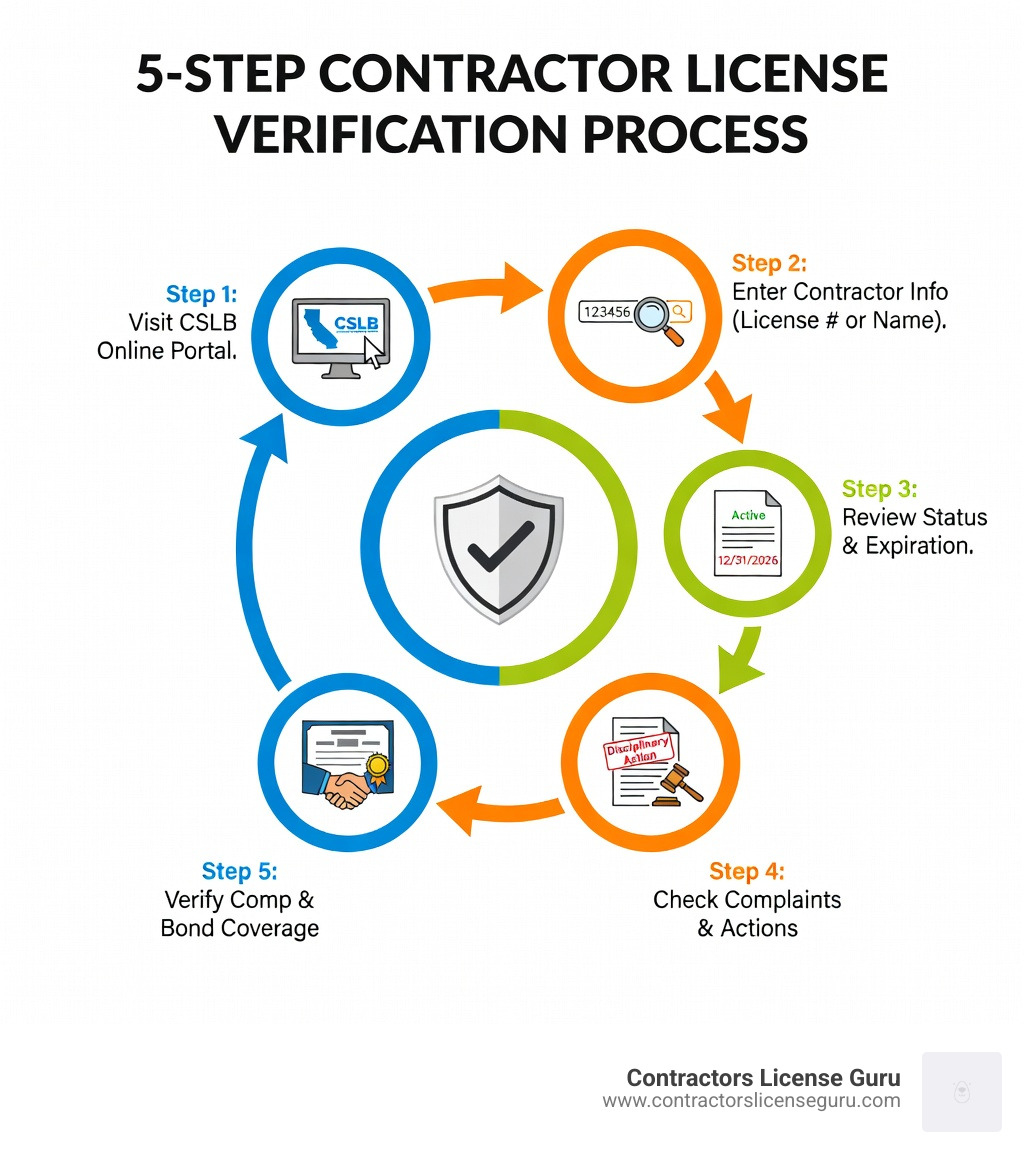
To begin your search, head over to the official Check a Contractor License or HIS Registration portal. This is the primary tool for anyone looking to check status of contractors license in the state of California.
Once you are on the CSLB website, you will notice three primary ways to search:
When the results pop up, pay close attention to the “Classifications” section. A contractor might have an active license, but is it the right one? For example, a C-36 Plumbing contractor shouldn’t be doing your electrical work (which requires a C-10). For more tips on navigating these results, read our article on California Contractor License Check: How to Verify a Contractor’s Credentials.
Many homeowners don’t realize that the person who comes to their door to sell the project—the salesperson—must also be registered with the CSLB. These individuals are known as Home Improvement Salespersons (HIS).
If a “project manager” or “sales rep” is asking you to sign a contract, you should use the Check a Contractor License or HIS Registration tool to verify their HIS registration. This ensures they are legally employed by the contractor and have undergone a background check. Hiring an unregistered salesperson can complicate your project if disputes arise later, as the contractor might try to disavow the promises made by that salesperson.
When you check status of contractors license, the screen will display a lot of data. Understanding what these terms mean is the difference between a successful project and a nightmare.
| Status | Meaning | Can They Work? |
|---|---|---|
| Active | The license is in good standing, bonded, and insured. | Yes |
| Inactive | The license is valid but the contractor has chosen not to do business currently. | No |
| Suspended | The license has been stripped of privileges due to a violation or failure to maintain requirements. | No |
| Expired | The contractor failed to renew the license by the deadline. | No |
Beyond the status, look at the “Contractor’s Bond” and “Workers’ Compensation” sections. If you see “This license has workers’ compensation insurance,” you’re in good shape. If it says “Exempt,” the contractor has certified they have no employees. If you see five guys working on your roof and the license says “Exempt,” you have a major liability issue on your hands.
One of the most common questions we get is: “Why can’t I see all the complaints against this guy?”
Under California law, specifically B&P 7124.6 complaint disclosure, the CSLB is restricted in what it can tell the public. Generally, only complaints that have resulted in legal action (like a citation or a formal accusation) are disclosed.
Additionally, per B&P 7071.17, only construction-related civil judgments reported to the CSLB are disclosed. This means a contractor might have pending lawsuits that aren’t showing up yet. Private arbitrations are also not listed unless the contractor fails to comply with the arbitrator’s award.
While the CSLB database is the gold standard, it isn’t perfect. We always tell our clients at Contractors License Guru that a license check is the start of the process, not the end.
One major limitation is database delays. Due to workload and processing times, a recent suspension or a new judgment might not appear instantly. There can be a lag between an event happening and it being entered into the public record.
To get the best results when you check status of contractors license, follow these expert tips:
For more technical advice on using the Board’s site, see our article on How to Use the California Licensing Board to Verify a Contractor’s Credentials.
While we specialize in California, we know that many of our readers own property elsewhere or are moving. Each state has its own system.
In New York City, for example, the NYC Department of Buildings (DOB) handles things. You would use the Skilled Trades Licensees/General Contractors/Registrant Search to verify credentials. They distinguish between skilled trades and general contractors, which is a bit different from the California system.
In Florida, the Department of Business and Professional Regulation (DBPR) oversees contractors under Chapter 455 of the Florida Statutes. They even have laws regarding email privacy for licensees, which you can read about in their Chapter 455 Florida Statutes section.
Regardless of the state, the rule remains: always use the official government portal. Avoid third-party “review” sites for license verification, as they are often outdated or pay-to-play.
If you check status of contractors license and find it is “Suspended” or “Inactive,” you should stop work immediately. A contractor cannot legally perform work exceeding $500 in labor and materials without an active license. If they are currently on your job, ask them for an explanation. It could be something simple like a late fee, or something serious like a canceled bond. Do not make any further payments until the status is “Active.”
If the online portal doesn’t give you the answers you need, you can call the CSLB at 800-321-2752. Based on call volume data, the shortest wait times are typically Wednesday through Friday, between 9:30–11:30 a.m. or 2:00–4:00 p.m. Avoid calling on Mondays or Tuesdays, or right after a holiday, as wait times can be extreme.
The CSLB website has a wealth of resources. We highly recommend reading the “Hiring a Contractor” guide before signing anything. If you have already had a bad experience, you can find the “File a Complaint” forms directly on their homepage. The CSLB is there to protect the consumer!
Verifying a contractor is more than just a box to tick; it’s your primary shield against the risks of home improvement. By taking five minutes to check status of contractors license, you ensure that the person responsible for your home’s structural integrity is qualified, insured, and accountable to the state of California.
At Contractors License Guru, we help contractors get their licenses the right way so they can provide high-quality, legal service to homeowners like you. If you’re a contractor looking to get your status to “Active” or a homeowner needing more guidance, we’ve got your back.
For more information on the verification process, visit our comprehensive guide on California Contractor License Check: How to Verify a Contractor’s Credentials. Stay safe, stay informed, and happy building!
